There are two platforms which are the best for creating a blog and the good thing is that both are free.
- Blogger
- wordpress.com
We will look at each of them with a step by step guide but before we do that, we need to look at the different parts of a blog.

Blog name
It is simply the title of your blog. It could be anything like, MY NEWS, MY LIFESTYLE. This depends on your choice. You name it.
Address
An address is similar to the domain name. It is something like mynews.blogspot.com (for free domains) or just mynews.com (for paid domains) if we were to use this address to create yours blog’s URL, it could appear like this http://mynews.blogspot.com or www.mynews.blogspot.com
Theme
The theme is about how your blog will be displayed on a web browser. It involves the layout, colours and the fonts to be used. Most blogs come with free themes.
Post
Posts are just articles that you write and publish to be seen by yourself or the public via the internet. They are similar to those on Facebook. You can base your post on a certain topic of your interest
Pages
Pages are similar to post, that is they are created the same way, but their functions could be different from those of posts. Pages are mostly used to tell more about your blog. Examples of popular pages are, Home, About and Contacts. Pages rarely change unless you want to update them.
1. Blogger
If you are looking for a simple and friendly user interface, then blogger is the best choice. To open a blog with blogger is very simple. It is one of the Google products among YouTube, Gmail, Google plus and others. If you have a Google account like Gmail then you already have a blogger account. all you need is to set it up and start posting.
Setting up your blogger account
Assuming that you already have a Google account, we are going straight to creating a blog with blogger. Login to your Google account then go the menu and select blogger (represented by a big orange B). You can also search for blogger on Google search.
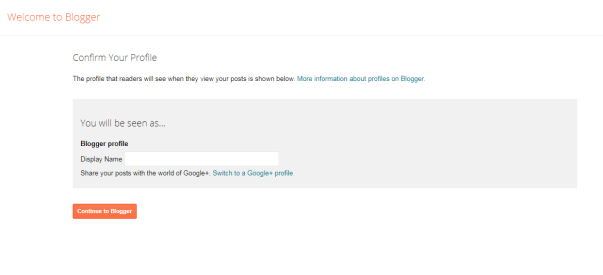
STEP 1. Confirm your profile/ choose your username
 Blogger and the blogger logo are registered trademarks of Google LLC, used with permission.
The “display name” is like your username. It is just like the name you use on facebook. So type the name of your choice then click “continue to blogger”
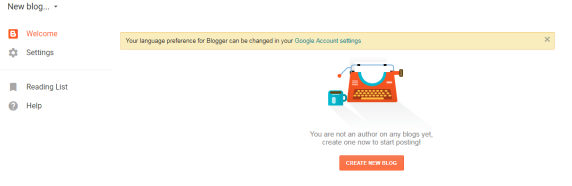
STEP 2. Create new blog
Blogger and the blogger logo are registered trademarks of Google LLC, used with permission.
After getting to this point, you might find a notice on European Union laws on cookies and data you collect from your blog’s viewers. You can ignore it for now but make sure you get back to it later. It is important. Click “CREATE NEW BLOG” to continue.
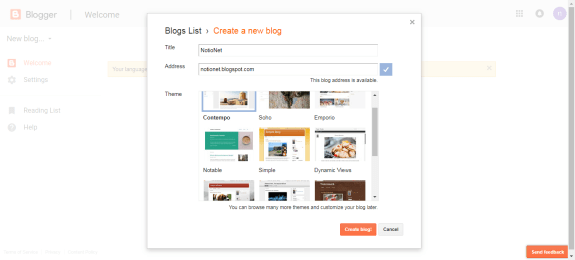
STEP 3. Name your blog
Blogger and the blogger logo are registered trademarks of Google LLC, used with permission.
- Add the title of your blog, could be any name you choose. This will be the name of your blog
- Add the address. Could be, yourblog.blogspot.com. IF the address you choose is not available as indicated by blogger, you will have to type a different one.
- Choose the theme you want to use among the free ones provided. You can choose to buy if you want a paid one.
After completing these three steps, you can click “create blog” and you are done creating a blog!
STEP 4. Creating your first post
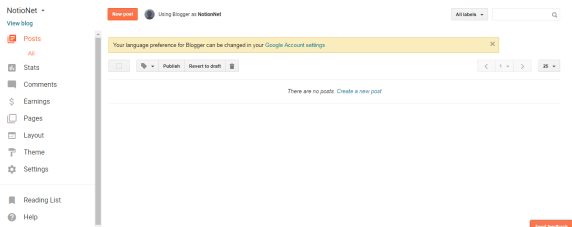
Blogger and the blogger logo are registered trademarks of Google LLC, used with permission.
Go to post on your dashboard (menu) click posts and you will be taken to a window similar or close to the one above. Click “New post” and you will open a window similar to the one below. Here you can create your post.
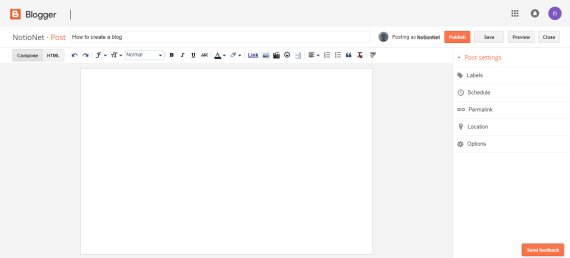 Blogger and the blogger logo are registered trademarks of Google LLC, used with permission.
After you are done writing and have proofread everything using your editor, click publish. Now your post is live and visible in the internet. You can share it on twitter, Facebook or Google plus. As you wish.
STEP 5. Additional settings and preferences
This is optional but I would recommend it. Go to your dashboard’s menu and get familiar with all the settings and options. Here you can change the theme or layout of your blog. Using the stats option, you can check how many people have viewed your blog posts. You can also choose to add pages i.e. an about page to tell viewer more about your blog or a contact page for viewers to contact you.
With the “Earnings” option, you can decide to sign up with Adsense to make money by placing ads in your blog. There is a lot you can do with blogger but you will need to get enough traffic (many viewers) to your blog to unlock its full potential.
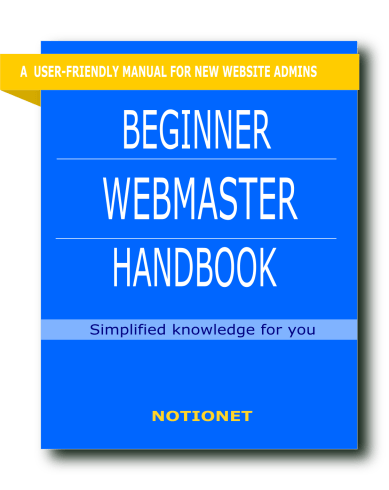
Coming soon is an E book on how to maintain your new blog or website. it is an easy to understand manual suitable for beginners. it takes you through all the steps, from registering a domain name to setting up a fully functioning site. The e book goes for KES 300($3) which is much cheaper than hiring a webmaster. The book will be available in the notionet store as soon as it is ready.You can book a copy by using the contact form.
 Notionet
Leave a comment