
The first step is to go straight to google play store and install the Status Saver app. If Play Store is not your preferred way of installing apps, you can try other app stores like Apk4fun or ApkMonk.
WhatsApp status saver is identified with a green download icon. Its interface is more similar to that of WhatsApp. The app enables you to save the posted status by your friends. Be it images or videos, big or small, it will do the job for you.
How to use the app
Its really easy to use this app. First you have to open it. You don’t have to do anything, then go to whatsapp and view your status as usual. When you can back to the status saver app, you will realize that it has already added the status you viewed in its images and videos catalog.
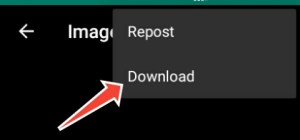
The only thing you need to do is click one of the images or videos. On the top right corner of the app, click the menu and select download. Now go to your phones gallery to check whether the image/video was downloaded successfully.
How the app works
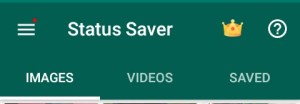
The status saver automatically adds the status you have viewed. It has has three sections, one for images, the second is for videos and the third for the saved status, the ones you have downloaded.
And that is how you simply download your WhatsApp status using the status saver app. If you have any other suggestion, please leave a comment. Also, if you are having trouble updating your whatsApp, check here for some help.
 Notionet
Leave a comment