
For you to automatically publish and share your posts, you need Jetpack plugin installed in your wordpress site. Why jetpack? Because jetpack comes with a feature called publicize.
What does publicize do?
Publicize auto shares your post to all your connected social networks. I.e. facebook, twitter, LinkedIn or tumblr. Using facebook as an example, the post you share will be published in your timeline under your profile.
The post will be displayed with an except and a link to direct readers to your blog. You can even connect a facebook page. The feature supports many accounts under one social network. So you can add even three different twitter accounts and publish to all of them in one click. Awesome right?
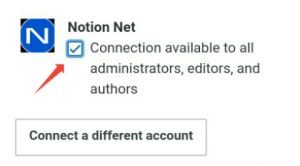
As you can see in this screenshot the feature is also accessible to other authors and editors. You can disable that by unchecking the box If that’s what you prefer.
View original post 176 more words
 Notionet
Leave a comment